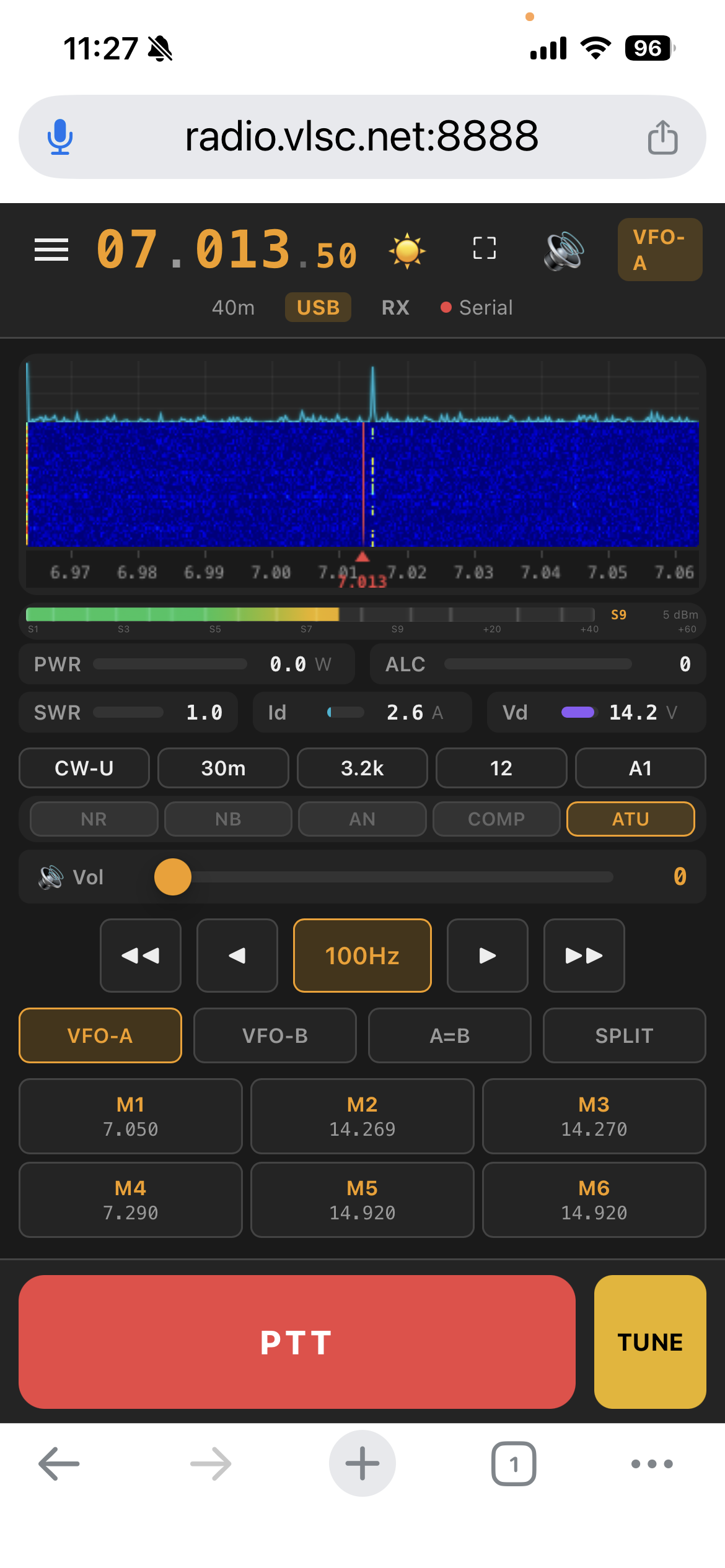
MRRC Modern — FFT spectrum plot + waterfall on iPhone
Browser-based remote control for eleven HF/50MHz radio profiles: Yaesu FT-710 and the SDR family FTDX10 / FTDX101D / FTDX101MP / FTX-1F / FT-891, Icom IC-7300/IC-7300MK2 plus the IC-705 / IC-7610 / IC-7760 preview profiles. Real-time FFT spectrum plot + waterfall (FT4222 SPI or CI-V), bidirectional Opus 48kHz audio, server-side QSO recording to MP3, full CAT control over 4+1 WebSocket channels — no $200 dongle required.
First launch on macOS: right-click → Open (the bundle is ad-hoc signed), and click Allow when macOS asks for the microphone — that permission is what carries the radio's audio input; without it RX plays silence with no error at all. If you see “is damaged and can't be opened” instead, the download predates v1.18.1, whose signature never succeeded — get this version. Details: macOS guide.
What's new in v1.28.1 full changelog →
New on the blog: A ¥125 Box as My FT-710's Remote Server — what a remote-radio server actually needs, how it compares with a Raspberry Pi or a mini PC, and the six defects the first real box exposed. all posts →
sign_for() is idempotent now: a usable pair for the same name is reused byte-for-byte
instead of re-signed, so a failed enrolment cannot leave the hub pinning one certificate while the
instance serves another (the all-night 502 on a live entry). A broken instance heals by clicking
Connect once. And the FT8 deep path no longer takes the server's DSP worker down with it: a Fortran
stop in the native decoder terminated the child process on every slot — silently,
because the launcher's startup tee stops writing to a file once the server answers HTTP. The worker's
own stdout/stderr now lands in logs/ft8-worker.log, the diagnostic bundle collects it,
and the FFTW thread initialisation returns a status instead of aborting.
cty.dat in the frozen
packages, a sibling virtualenv staged into the ARM image, three POSIX-only tests never collected on
Windows).
Every size and SHA-256 on this page is checked against the built artifact by
release_check.py, so a stale download card fails the build
instead of shipping.
MRRC Modern — FFT spectrum plot + waterfall on iPhone
A two-minute product tour of MRRC Modern (English narration and subtitles).
Real spectrum (FT4222 SPI or CI-V), bidirectional Opus audio, server-side QSO recording, full CAT/CI-V control and multi-layer PTT safety — ten pluggable radio profiles (FT-710, IC-7300/MK2, the IC-705 / IC-7610 / IC-7760 previews and the Yaesu SDR family FTDX10 / FTDX101D / FTDX101MP / FTX-1F), no middleware anywhere.
FT-710: 850-point FFT spectrum at ~21 fps read straight from the
DSP chip over FT4222 SPI. IC-7300/MK2: CI-V 0x27
475-bin scope upsampled to 850 points. TX-aware pause keeps the
scope clean while transmitting; automatic S-meter fallback when
no hardware path is available.
EMA-smoothed spectrum polyline above a 120-row history waterfall. Shared Floor/Ceil controls, six colormaps, and click-to-QSY anywhere on the spectrum.
One 48 kHz codec domain end to end: RX capture → Opus 64kbps → browser AudioWorklet; browser mic → Opus CBR → server → radio. The FT-710 backend bridges to its fixed 44.1 kHz USB-audio device boundary (960→882 per 20 ms); the IC-7300 backend uses native 48 kHz USB audio with no resample.
FT-710: direct serial CAT over the Enhanced COM Port at 38400 baud (frequency, modes, filters, VFO A/B, split, preamp, ATT, NR/NB/AN, compressor, tuner, gains). IC-7300/MK2: USB CI-V at 115200 8N1 (addr 0x94), with Icom mode/band/filter tables and capability-driven UI adaptation.
100ms→5s smart intervals, 0.25s per-query timeout ceiling, and priority preemption so PTT never waits for a poll cycle. Stale in-flight reads are discarded after user commands.
Canvas S-meter (S1–S9+60dB) with dBm readout plus full TX telemetry: PWR / ALC / SWR / Id / Vd / COMP. Memory channels with one-tap recall; every UI preference persists in cookies.
Press REC in the browser and the whole QSO is written on the server: reloading the page, closing the tab or losing CAT does not stop it. RX and mic audio land on one monotonic 16 kHz timeline and encode to MP3 as they arrive, so even a server crash leaves a playable prefix on disk.
MRRC_RECORDINGS_MAX_SESSION_MIN only stopsOptional networked ATR1000 antenna tuner: learned LC relay values follow every frequency change, and a server-side tune assist runs the full carrier-measure-keep-or-rollback sequence for you.
A NanoVNA-H on the box's USB becomes a real vector analyzer page at
/Nano: the complex S11 of the antenna itself, not an
inference from reflected power.
FT8 receive and transmit inside the same server — decoding runs in its own worker process, so an SSB contact and a weak-signal slot can share the radio.
An SDRplay RSP1 on the box becomes a public web receiver at /sdr:
10 kHz – 2 GHz, its own password and page, in no way coupled to radio control.
(offset, mode, bandwidth)The box pairs a Bluetooth HID remote and drives the radio directly — no browser, no login: the operator stands next to the antenna and tunes with the handset.
ptt:false; the power key is ignored on purposeWhen something needs a second pair of eyes, the box can open a timed SSH window to us — nothing permanent, nothing open until you ask for it.
The menu's 🐞 Report a problem builds a redacted diagnostics bundle on the server — logs, config snapshot, radio/audio state and an auto-triage summary — and uploads it to this project's own receiver, or saves it locally when there is no uplink. Conclusions are published on the answers page, searchable by bundle id or keyword; the engineering loop behind them — bug / feature / noise classification, scheduling and unattended fixes — is on the FDE board.
Touch-and-hold TX with instant release on touch-end. Fire-and-forget TX0 with 500ms TX-status poll + browser watchdog. Server-side forced RX when the last client — or the TX-audio owner — disconnects.
Optimised for iPhone Safari: safe-area adaptation, PWA manifest with Service Worker offline caching, Wake Lock, fullscreen toggle, and native iOS / Android companion apps.
Your station stays at home, the computer or the W103D box. It dials out to the hub and you work the same radio from a browser. Nothing on your router is touched.
The box only dials out, never opens a port. Your router does not have to change. Home broadband, 4G/5G, an office network: the same.
<call>.mrrc.vlsc.net is the entry point. The call sign is both the
tenant and the account — there is no second username to maintain.
The hub carries traffic and never keys the radio. When the link dies, the machine beside the radio puts it back on receive — not a timer in the cloud.
A real certificate from browser to hub, and the hub checks yours by name. No hop is paid for by switching verification off.
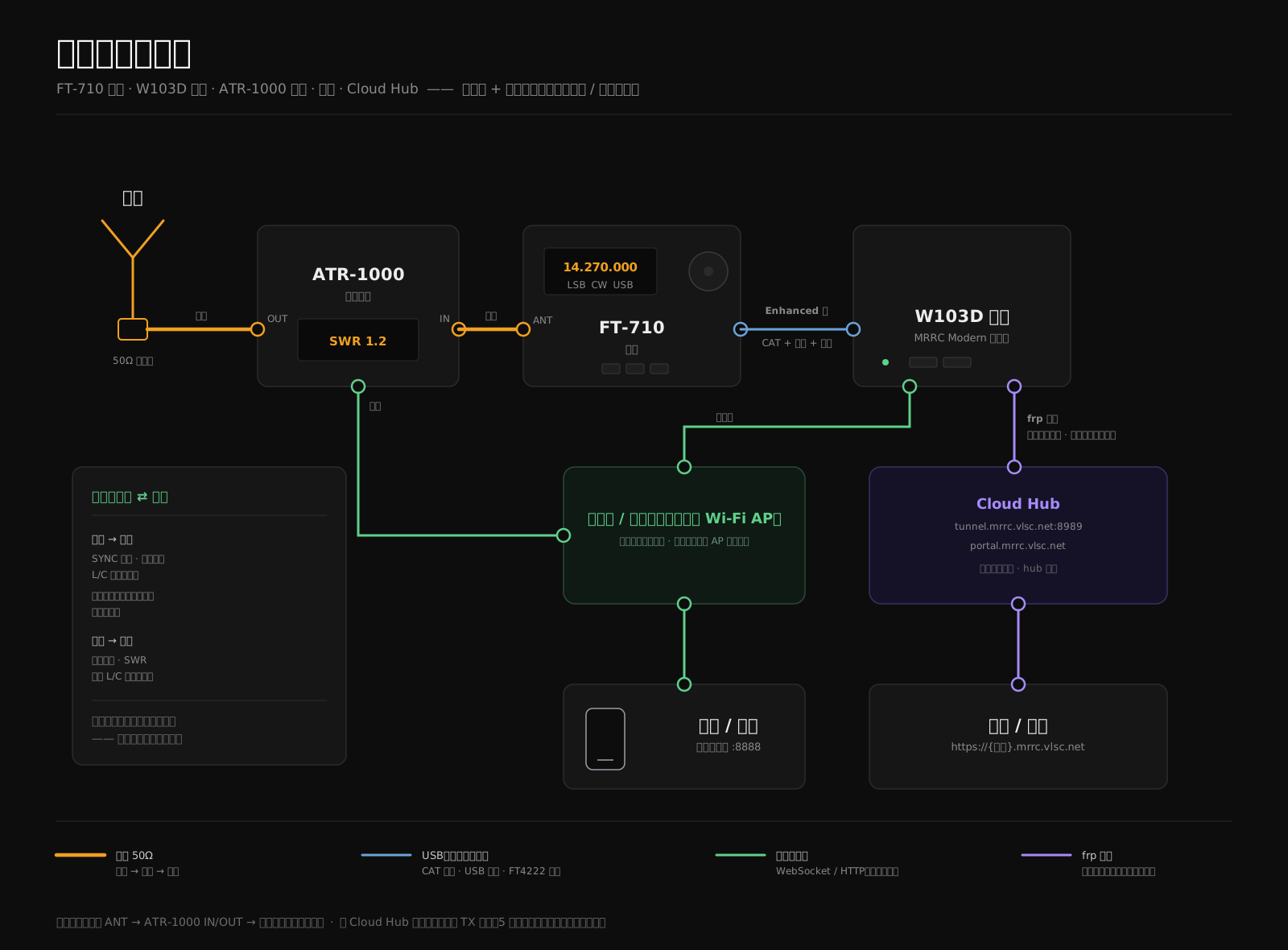
The router in this picture can be a Wi-Fi AP instead. The box only has to share a network with the phone. The tunnel leaves the house; the RF does not. Full Cloud Hub site →
Windows 11/12 x64 — embedded Python 3.12 runtime, no manual Python install. Start Menu launcher with per-user config in %LOCALAPPDATA%.
MRRC-Modern-Setup.exe — v1.28.1 Stable
75.7 MB · x64 · 79,386,940 bytes
SHA-256: cfbeacc7…
The ☰ menu now carries the radio's own power switch (restart = off, then a bounded, cancellable wake-up loop; off = off for good), and the version you are running is printed in the menu footer. Outbound HTTPS (portal, tunnel, diagnostics upload) trusts the CA bundle shipped inside the installer instead of the machine's certificate store. The native DSP library still ships inside the installer with its runtime dependencies, so nothing has to be compiled on your machine. First run is still zero-config: the web password is generated and shown on the login page, and the radio (FT-710 ASCII CAT / Icom CI-V) and its COM port are detected automatically. The web Connection Settings dialog still changes the radio model, serial port, RX+TX audio devices and password with save-and-restart.
MRRC-Modern-v1.28.1-arm64.dmg — v1.28.1 Stable
81.1 MB · arm64 · Apple Silicon (M1/M2/M3/M4) · macOS 11+ · 85,064,796 bytes
SHA-256: 1c9ba24e…
First run needs zero configuration: MRRC Modern auto-generates a
web password, auto-detects the radio (FT-710 ASCII CAT / Icom CI-V
0x19) and its serial port, and bundles the FT4222 true-spectrum
dylibs — the FT-710 FFT waterfall works out of the box (v1.25.1 fixed the launcher
path that kept the scope worker from finding them at all). A web
连接设置 (Connection Settings) dialog lets you change the radio
model, serial port, RX+TX audio devices, and password with
save-and-restart. HTTPS is on by default with an auto-generated
self-signed certificate, and the server binds ::
dual-stack (IPv4+IPv6), so LAN devices reach
https://<mac-ip>:8888 (browser warns once about
the self-signed cert — accept it). The DMG is ad-hoc signed — on
first launch, right-click → Open once.
MRRC-Modern-rpi64.img.xz — Raspberry Pi
531 MB (530,820,848 bytes) · arm64 · Pi 3B+/4/5 · · Raspberry Pi OS Lite 64-bit (Bookworm)
SHA-256: a00ab22897bf3e3565fcb5b50eff9585b2885c7b831dd2ae594672d62475e5be
Flash with Raspberry Pi Imager ("Use custom image"), boot, and open
https://raspberrypi.local:8888. Zero-config first boot:
an auto-generated web password (HDMI console / SSH motd /
sudo mrrc-show-password) or pre-seed your own via a
mrrc.env file on the boot partition. Radio and serial
port are auto-detected; FT-710 true FFT works out of the box (the aarch64 FTDI libs ship
inside the image since v1.26.0; S-meter fallback on radios without FT4222); the IC-7300 works out of the box via CI-V.
MRRC-Modern-1.28.4-w103d.img.gz — ZTE W103D
1.22 GB (1,220,510,546 bytes) · arm64 · ZTE W103D (Amlogic S905L3A, 2 GB RAM) · Armbian 26.11 bookworm
SHA-256: 14dbf2dd8b8326db4457ab8a81b9182aaf8c4c9244b5ec41e967e15906125b51
A ready-made server image for this specific TV box, pre-configured so
it needs no setup: web login and the root /
mrrc system accounts are already set to
abcd!1234 and abcd1234, timezone is
Asia/Shanghai and locale is zh_CN.UTF-8. Flash it to a USB stick, boot
the box from it (one u-boot boot-order write; Android's partitions and
data stay untouched), and open https://<box-ip>:8888.
Change those three passwords first — the guide walks
through it (/settings). mrrc-radio switches
between the eleven supported radio models. Once you are happy with it,
install it onto the box's own 28.9 GB eMMC: what is left is a power
cable and a network cable, with the USB stick kept as the rescue copy.
Without the FTDI DLLs the FT-710 backend falls back to the S-meter synthetic spectrum — CAT control and audio are unaffected (the IC-7300 backend needs no FTDI at all). macOS / Windows: use the installers above. Raspberry Pi: flash the image above. Generic Linux: run from source (see Quick Start below).
Windows and macOS users take the installer track; Linux / Raspberry Pi run from source. All end at the same browser UI.
FT-710: Silicon Labs CP210x VCP driver for the Enhanced COM Port; FTDI D2XX only if you want FT4222 true spectrum. IC-7300: none — single USB cable with built-in serial driver.
Device Manager → Ports (COM & LPT) → Enhanced COM Port
MRRC-Modern-Setup.exe — v1.28.1, 75.7 MB, x64. Start Menu + optional desktop shortcut.
SHA-256 cfbeacc75e899ed1ff04a6a9da5a9d37d3f0200d89b77440215266eddde33938
First run auto-configures the radio and password. The web 连接设置 (Connection Settings) dialog sets the radio model, serial port, RX+TX audio devices, and password with save-and-restart.
%LOCALAPPDATA%\MRRC-Modern\mrrc_modern.env
Start Menu → MRRC Modern — the launcher starts the server and opens the browser automatically.
https://127.0.0.1:8888 → login → full control
Drag MRRC-Modern-arm64.dmg → double-click to
mount → drag MRRC Modern into Applications. On
first launch, right-click the app → Open → Open (one-time
Gatekeeper bypass for the ad-hoc signature).
macOS 11.3+ ships native CP210x support — the FT-710's serial port enumerates without any driver install (verified on Sequoia). Only on macOS 10.11–11.2, install Silicon Labs CP210x VCP Driver v6.0.3: SiLabsUSBDriverDisk.dmg (mount → run the installer → approve the kernel extension in System Settings; on Apple Silicon this requires lowering Startup Security to allow user-managed kernel extensions). FT4222 spectrum libraries are bundled — no D2XX install.
ls /dev/cu.usbserial-*
The menu-bar icon MRRC Modern :8888 appears and the
browser opens the login page (over HTTPS — the first time the
browser shows an "untrusted" warning, click Advanced →
Continue), which shows the auto-generated password.
Connect the FT-710 or IC-7300/MK2 via USB; the radio model and serial port auto-detect on first run.
Menu bar → 连接设置… (Connection Settings) to change the radio,
serial port, RX+TX audio devices, or password, then 保存并重启
(Save & Restart). LAN devices reach
https://<mac-ip>:8888.
Optional drivers — usually not needed (macOS has built-in support): FTDI D2XX (FT-710 spectrum fallback) · SiLabs CP210x (serial-port fallback) — prerequisites & install steps in the guide §0.7.
Get the latest code from GitHub
git clone https://github.com/cheenle/mrrc_modern.git
Python 3.12+ with FastAPI, Uvicorn, PySerial, PyAudio, NumPy
cd mrrc_modern && pip install -r requirements.txt
Choose the radio model and serial port, then launch
MRRC_RADIO_MODEL=ft710 MRRC_SERIAL_PORT=/dev/cu.usbserial-XXXX python server.py
Any device on your network — phone, tablet, desktop. Set a strong password before exposing the server.
https://server-ip:8888 → login → full control
For real FT4222 SPI spectrum data on the FT-710, install libft4222 + libftd2xx from the wfview app bundle or FTDI website; the IC-7300 backend reads spectrum over the same USB serial cable and needs no FTDI libraries. CAT/CI-V control and audio always work without them.
4+1 WebSocket connections (optional ATR1000 tuner link), zero external middleware, built entirely on Python async frameworks. Pick the radio with MRRC_RADIO_MODEL.
SwiftUI (iOS 17+) and Kotlin/Compose (Android) companion apps — same 4+1-channel WebSocket protocol as the browser, tuned for one-handed mobile operation.
Frequency (direct entry / step / band jump), VFO A/B, mode, filter width, Preamp/ATT, AGC, NB/NR/ANotch, RF power, mic gain, squelch — all from the iPhone.
850-bin real-time waterfall with FFT curve, colormap matched to the web UI. S-meter plus TX meters (PWR / SWR / ALC / COMP) and memory channel list.
RX: Opus 48kHz decode and playback through the device speaker. TX: mic capture at 48kHz in 20 ms PCM frames — hold PTT to talk.
Kotlin + Jetpack Compose (Material3, minSdk 26) app speaking the same protocol: full control, waterfall + meters, Opus RX/TX, memory channels, and DataStore settings.
Download APK v1.1.32 (Android 8.0+)
MRRC-Modern-v1.1.32-Android.apk · 9.0 MB · SHA-256 dbd3a49ee752e731351bf7b0e6c065cb82af41ccd4b1c41cfbeb4e6066c1f65e
Install: allow “install unknown apps”, then open the APK.
⚠ This build uses a new signing key: uninstall the previously installed app first (its server settings and login will be cleared).
Early access — build from source
iOS build requires a physical iPhone (simulator unsupported —
bundled libopus is arm64-device-only), iOS 17+, Xcode 15 +
XcodeGen, and a TLS-enabled server. The P0 PTT-safety issues from
the 2026-07-20 audit are resolved — TX uplink ownership follows
the keying client. Android: pure logic (protocol, PTT, spectrum,
memory channels) is covered by JVM tests via
./gradlew test assembleDebug lintDebug; on-device RF
acceptance is pending.
Scan the QR code with WeChat to join the MRRC-HAM group.
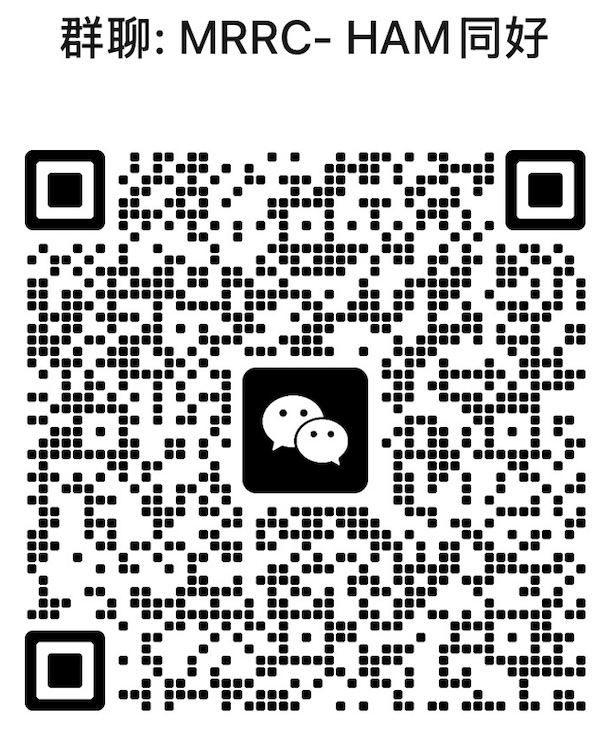
QR code valid until Oct 8, 2026. Will be updated when refreshed.
IBM TeamSD methodology · 15 chapters · V3.03 · Architecture decisions, component model, PTT safety, and full version history.
升级后行为异常、或想从零开始:下载清理脚本(说明与注意事项见指南 §6.2),一键卸载并清掉历史残留(会先备份到桌面)。
随笔:Highbrow and Lowbrow — On Muscle and Mind(48 小时、两个模型、六个版本之后的复盘)
Writing: blog - how the radio reaches the internet, and what the first day taught.