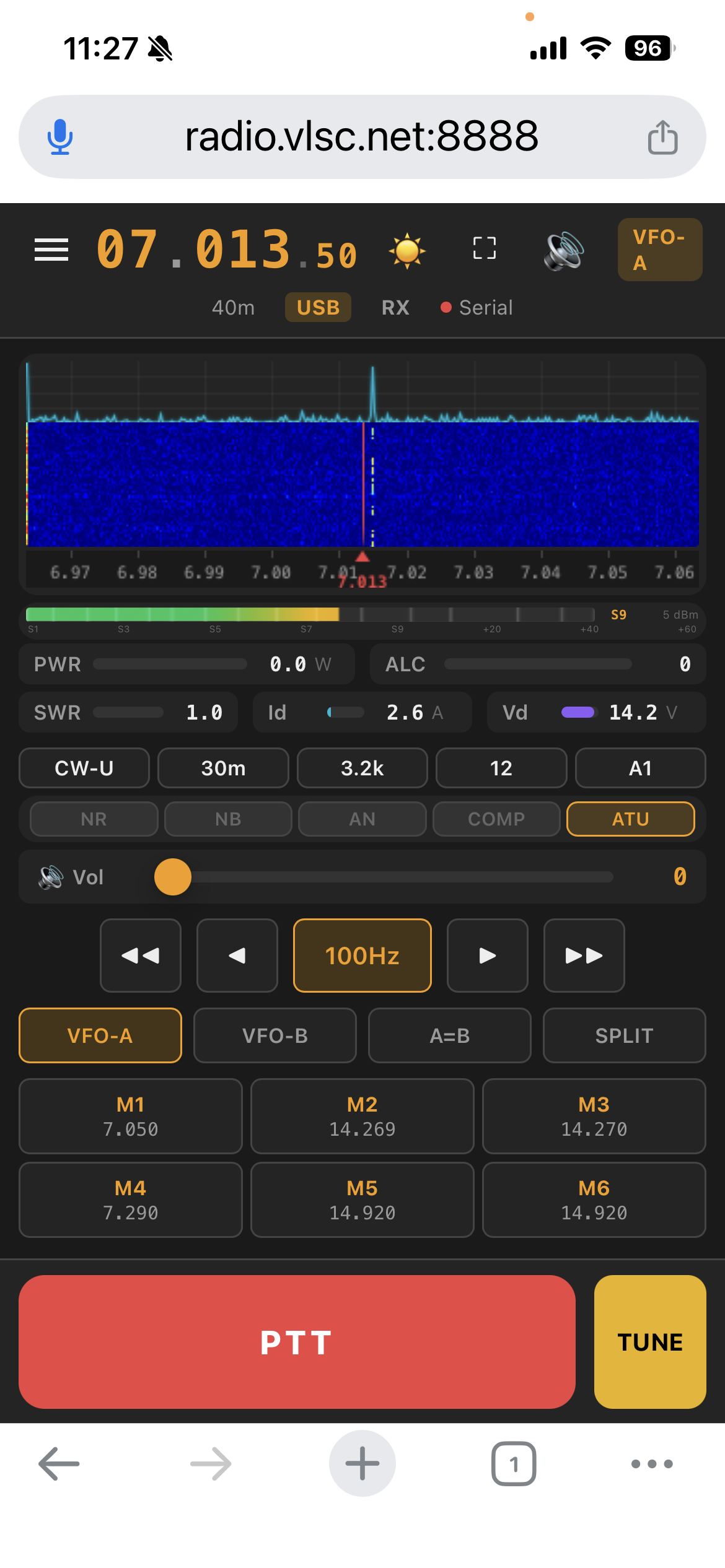
FT-710 Web Control — FFT spectrum plot + waterfall on iPhone
Software SCU-LAN10 replacement for the Yaesu FT-710 HF/50MHz transceiver. Real-time FFT spectrum plot + waterfall via FT4222 SPI, bidirectional Opus 48kHz audio, full CAT control over 4 WebSocket channels — no $200 dongle required.
FT-710 Web Control — FFT spectrum plot + waterfall on iPhone
A two-minute product tour of FT-710 Web Control (Chinese narration and subtitles).
Real FT4222 SPI spectrum, bidirectional Opus audio, full CAT control and multi-layer PTT safety — everything built specifically for the FT-710, no middleware anywhere.
850-point FFT spectrum at ~21 fps read straight from the FT-710 DSP chip over FT4222 SPI. The scope pipe is TX-aware: it pauses cleanly while you transmit and re-syncs in about a second on release. Automatic S-meter synthetic fallback when FT4222 is unavailable.
EMA-smoothed spectrum polyline above a 120-row history waterfall. Shared Floor/Ceil controls, six colormaps, and click-to-QSY anywhere on the spectrum.
One 48 kHz codec domain end to end: RX capture → Opus 64kbps → browser AudioWorklet; browser mic → Opus CBR → server → radio. Every platform, including Windows, bridges the 48 kHz codec domain to the FT-710's fixed 44.1 kHz USB-audio device boundary (960→882 samples per 20 ms frame).
Direct serial CAT over the Enhanced COM Port at 38400 baud. 40+ commands: frequency, 15 modes, 23 filter widths, VFO A/B, split, preamp, attenuator, NR/NB/AN, compressor, tuner, AF/RF/Mic gains.
100ms→5s smart intervals at 38400 baud, 0.25s per-query timeout ceiling, and priority preemption so PTT never waits for a poll cycle. Stale in-flight reads are discarded after user commands.
Canvas S-meter (S1–S9+60dB) with dBm readout plus full TX telemetry: PWR / ALC / SWR / Id / Vd / COMP. Memory channels with one-tap recall; every UI preference persists in cookies.
Optional networked ATR1000 antenna tuner: learned LC relay values follow every frequency change, and a server-side tune assist runs the full carrier-measure-keep-or-rollback sequence for you.
Touch-and-hold TX with instant release on touch-end. Fire-and-forget TX0 with 500ms TX-status poll + browser watchdog. Server-side forced RX when the last client — or the TX-audio owner — disconnects.
Optimised for iPhone Safari: safe-area adaptation, PWA manifest with Service Worker offline caching, Wake Lock, fullscreen toggle, and a native SwiftUI companion app.
Windows 11/12 x64 — embedded Python 3.12 runtime, no manual Python install. Start Menu launcher with per-user config in %LOCALAPPDATA%.
MRRC-FT710-Setup.exe — v1.8.0 Stable
35.2 MB · x64
SHA-256: 36a48a5f3f325d112937751bddcdebc581039d0484a40c95c1b00fd4bcc170ea
v1.8.0 Stable keeps browser/Opus audio at 48 kHz and always converts each 960-sample TX frame to 882 samples at the FT-710's fixed 44.1 kHz device boundary, including after PortAudio reinitialization. TX-session logs now expose queue drops, and same-session reconnects safely replace stale audio ownership. Windows build, 439 tests, install/start/uninstall, and bundled-file checks passed; physical RF monitoring remains an operator-side acceptance check.
Without the FTDI DLLs the app falls back to the S-meter synthetic spectrum — CAT control and audio are unaffected. macOS / Linux / Raspberry Pi: run from source (see Quick Start below).
Windows users take the installer track; macOS / Linux / Raspberry Pi run from source. Both end at the same browser UI.
Silicon Labs CP210x VCP driver for the FT-710 Enhanced COM Port. FTDI D2XX only if you want FT4222 true spectrum.
Device Manager → Ports (COM & LPT) → Enhanced COM Port
MRRC-FT710-Setup.exe — v1.8.0, 35.2 MB, x64. Start Menu + optional desktop shortcut.
SHA-256 36a48a5f3f325d112937751bddcdebc581039d0484a40c95c1b00fd4bcc170ea
Start Menu → Edit Configuration — set the Enhanced COM Port and a strong web password.
%LOCALAPPDATA%\MRRC-FT710\ft710.env
Start Menu → MRRC FT-710 — the launcher starts the server and opens the browser automatically.
http://127.0.0.1:8888 → login → full control
Get the latest code from GitHub
git clone https://github.com/cheenle/mrrc_ft710.git
Python 3.12+ with FastAPI, Uvicorn, PySerial, PyAudio, NumPy
cd mrrc_ft710 && pip install -r requirements.txt
Set the serial port and launch — auto-detects FT-710 USB devices
FT710_SERIAL_PORT=/dev/cu.usbserial-XXXX python server.py
Any device on your network — phone, tablet, desktop. Default password: ft710
https://server-ip:8888 → login → full control
For real FT4222 SPI spectrum data, install libft4222 + libftd2xx from the wfview app bundle or FTDI website. CAT control and audio work without any FTDI libraries.
4 WebSocket connections, zero external middleware, built entirely on Python async frameworks.
SwiftUI companion app (iOS 17+) — same 4-channel WebSocket protocol as the browser, tuned for one-handed mobile operation.
Frequency (direct entry / step / band jump), VFO A/B, mode, filter width, Preamp/ATT, AGC, NB/NR/ANotch, RF power, mic gain, squelch — all from the iPhone.
850-bin real-time waterfall with FFT curve, colormap matched to the web UI. S-meter plus TX meters (PWR / SWR / ALC / COMP) and memory channel list.
RX: Opus 48kHz decode and playback through the device speaker. TX: mic capture at 48kHz in 20 ms PCM frames — hold PTT to talk.
Early access — build from source
Requires a physical iPhone (simulator unsupported — bundled libopus is arm64-device-only), iOS 17+, Xcode 15 + XcodeGen, and a TLS-enabled server. The P0 PTT-safety issues from the 2026-07-20 audit are resolved — TX uplink ownership follows the keying client.
IBM TeamSD methodology · 15 chapters · V2.9 · Architecture decisions, component model, PTT safety, and full version history.
Scan the QR code with WeChat to join the MRRC-HAM group.

QR code valid until Aug 29, 2026. Will be updated when refreshed.